
Claude Cowork Setup Guide: Boost Productivity in 60 Minutes
Claude Cowork Setup Guide: Boost Productivity in 60 Minutes
Claude Cowork Setup Guide: Boost Productivity in 60 Minutes
Claude Cowork Setup Guide: Build Your AI Workspace in Just 60 Minutes
Introduction
If you’re using Claude the same way you use ChatGPT, you’re only scratching the surface.
One of Claude’s most powerful capabilities is Claude Cowork—a structured workspace that remembers your preferences, projects, writing style, and workflows. Instead of repeating prompts, copying templates, or explaining your requirements every time, you create a system once and let Claude work with consistent context.
This guide walks you through a simple 60-minute Claude Cowork setup that helps content creators, marketers, business owners, freelancers, developers, students, and AI professionals save hours every week.
Why Most People Use Claude Inefficiently
Many users open Claude and start every conversation from scratch.
That means they repeatedly:
Explain their writing style
Describe their business
Paste long prompts
Recreate templates
Rewrite AI-generated content
Organize files manually
A properly configured Claude workspace eliminates these repetitive tasks.
Benefits of Setting Up Claude Cowork
After completing this setup, you’ll be able to:
Save hours every week
Maintain consistent writing quality
Reduce repetitive prompting
Improve AI-generated content
Organize projects efficiently
Generate documents faster
Build reusable AI workflows
Increase productivity for personal and business tasks
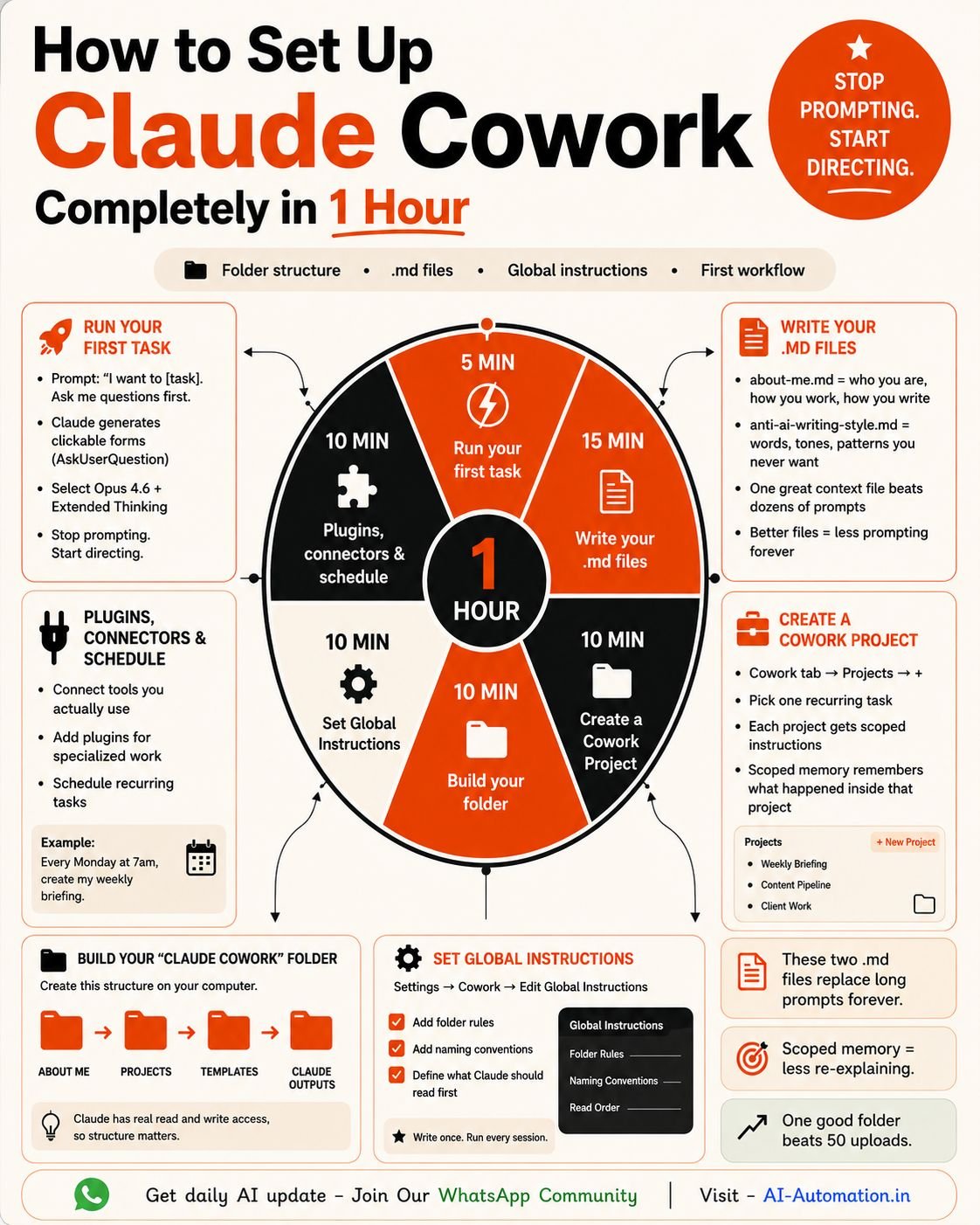
Step 1: Create Your Workspace (0–10 Minutes)
Start by creating these four folders:
📂 ABOUT ME
📂 PROJECTS
📂 TEMPLATES
📂 CLAUDE OUTPUTS
Why These Folders Matter
📂 ABOUT ME
Store information that helps Claude understand you.
Examples:
Personal profile
Business information
Writing preferences
Brand voice
Target audience
Goals
📂 PROJECTS
Organize ongoing work such as:
Blog articles
Research
Client work
Marketing campaigns
Product launches
Documentation
📂 TEMPLATES
Store reusable content including:
Email templates
Proposal templates
Blog outlines
Social media frameworks
SOPs
Prompt templates
📂 CLAUDE OUTPUTS
Save generated content like:
Reports
Articles
Research
Meeting notes
Marketing copy
Documentation
Step 2: Create Two Essential Files (10–25 Minutes)
File 1: about-me.md
Include information such as:
Your name
Profession
Industry
Business goals
Target audience
Writing tone
Preferred formatting
Content objectives
This gives Claude long-term context and helps it generate more personalized responses.
File 2: anti-ai-writing-style.md
This is one of the most valuable files you can create.
List the words, phrases, and writing habits you never want Claude to use.
Avoid Words & Phrases
Dive into
Delve
Revolutionize
Leverage
In today’s fast-paced world
Unlock the power
Game changer
Seamlessly
Ultimately
Transformative
Preferred Writing Style
Instead, tell Claude to write using:
Short sentences
Active voice
Human tone
Clear explanations
Practical examples
No fluff
Simple English
This single document can dramatically improve every response Claude generates.
Step 3: Configure Global Instructions (25–35 Minutes)
Create permanent working rules for Claude.
File Naming
YYYY-MM-DD-Topic
Folder Rules
Save research in Research
Save articles in Blog
Save reports in Reports
Output Preferences
Markdown
Tables
Bullet lists
SEO-friendly structure
Headings
Checklists
Writing Preferences
Human-first writing
Professional tone
SEO optimized
No AI clichés
Actionable content
Simple language
Once configured, Claude remembers your preferred workflow and produces more consistent outputs.
Step 4: Create Your First Project (35–45 Minutes)
Choose one recurring task you perform every week.
Examples include:
LinkedIn content
Weekly reports
Client proposals
SEO articles
Research
Documentation
Meeting summaries
Email campaigns
Business plans
Set it up once.
Reuse it forever.
Step 5: Let Claude Ask Questions First (45–55 Minutes)
Instead of writing long prompts every time, use this simple instruction:
“I want to complete this task. Ask me the questions you need before creating the final output.”
Claude will gather the required context before generating content.
This leads to:
Better context
More accurate responses
Less editing
Higher-quality output
More personalized results
Step 6: Automate a Recurring Task (55–60 Minutes)
Automation is where Claude becomes a true productivity partner.
Example:
“Every Monday at 7:00 AM, create my weekly AI news briefing.”
Other automation ideas include:
Weekly reports
Content calendar
Meeting summaries
Market research
SEO audits
Competitor analysis
Project status updates
Learning summaries
Best Practices for Claude Cowork
To get the best results:
Keep folders organized
Update your About Me file regularly
Refine your writing preferences over time
Save reusable templates
Review AI outputs before publishing
Build standardized workflows
Automate repetitive tasks
Create project-specific instructions
Common Mistakes to Avoid
Avoid these common mistakes:
Starting every chat from scratch
Using generic prompts
Ignoring project organization
Not defining your writing style
Saving everything in one folder
Rewriting the same prompts repeatedly
Forgetting to update templates
Overcomplicating your workspace
Who Should Use Claude Cowork?
Claude Cowork is ideal for:
Content Creators
Bloggers
SEO Professionals
Digital Marketers
AI Automation Experts
Business Owners
Students
Researchers
Freelancers
Agencies
Developers
Consultants
Conclusion
Claude is far more than a conversational AI assistant—it can become a structured digital coworker that understands your workflow, writing preferences, and ongoing projects. By investing just 60 minutes to organize your workspace, create reusable templates, define clear instructions, and automate recurring tasks, you’ll spend less time repeating prompts and more time producing high-quality work.
Whether you’re creating content, managing clients, conducting research, or running a business, a well-configured Claude workspace helps you work faster, stay organized, and maintain consistent results. Set it up once, refine it over time, and let Claude become an extension of your daily workflow instead of starting from a blank chat every day.
Claude Cowork is a structured workspace approach that helps Claude understand your projects, writing style, preferences, and workflows. It enables more consistent and efficient AI assistance without repeating the same prompts in every conversation.
A basic Claude Cowork setup takes around 60 minutes. Once configured, it can save hours of repetitive work each week by providing Claude with consistent context and reusable templates.
Yes. By defining your writing style, preferred formatting, and words to avoid, Claude generates more personalized, natural, and consistent content that requires less editing.
Claude Cowork is useful for bloggers, SEO specialists, marketers, business owners, freelancers, developers, students, researchers, consultants, agencies, and anyone who regularly uses AI for writing, planning, or project management.
What You Will Master.
- AI Fundamentals & Prompt Engineering
- Automation Tools & No-Code Systems
- AI for Business & Marketing
- Real-World Project Building
- Freelancing & Career Strategy
Apply for Learning
AI Program